
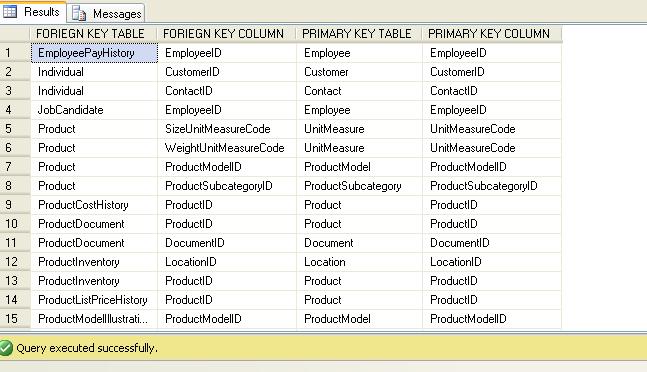
Query to find Related tables, related by Foreign Key and Primary Key

Many times, When we come to a situation to start our work from already developed project, Where Foreign Keys and Primary Keys are already developed in Database, It is Necessary for us to know which table is referring to which table as with Primary Key and Foreign Key Constraint.

For this Purpose, We have System Tables which will Help us to find the Primary key and Foreign key and related Tables.

The query is as follows:

USE ADVENTUREWORKS2008
GO

SELECT OBJECT_NAME(SFK.PARENT_OBJECT_ID) AS [FORIEGN KEY TABLE]
 ,COL_NAME(SFKC.PARENT_OBJECT_ID, SFKC.PARENT_COLUMN_ID) AS [FORIEGN KEY COLUMN]
 ,OBJECT_NAME(SFK.REFERENCED_OBJECT_ID) AS [PRIMARY KEY TABLE]
 ,COL_NAME(SFKC.REFERENCED_OBJECT_ID, SFKC.REFERENCED_COLUMN_ID) AS [PRIMARY KEY COLUMN]
FROM SYS.FOREIGN_KEYS AS SFK
INNER JOIN SYS.FOREIGN_KEY_COLUMNS AS SFKC ON SFK.OBJECT_ID = SFKC.CONSTRAINT_OBJECT_ID


Here I'm trying to find Related tables under Primary key and 
Foreign key Constraint in AdventureWorks2008 Database.

Here,
--OBJECT_NAME: Returns the database object name for schema-scoped objects.
--COL_NAME:    Returns the name of a column from a specified corresponding table identification number and column identification number.
--SYS.FOREIGN_KEYS: Contains a list of all FOREIGN KEYS in the database. It contains one row per FOREIGN KEY.
--SYS.FOREIGN_KEY_COLUMNS: Contains a row for each column, or set of columns, that comprise a foreign key.


Comments

Popular posts from this blog

BIG Data, Hadoop – Chapter 2 - Data Life Cycle

Data Life Cycle The data life cycle is pictorial defined as show below:     As we see, in our current system, we capture/ Extract our data, then we store it and later we process for reporting and analytics. But in case of big data, the problem lies in storing and then processing it faster. Hence Hadoop takes this portion, where it stores the data in effective format (Hadoop distributed File System) and also process using its engine (Map Reduce Engine). Since Map Reduce engine or Hadoop engine need data on HDFS format to process, We have favorable tools available in market to do this operation. As an example, Scoop is a tool which converts RDBMS to HDFS. Likewise we have SAP BOD to convert sap system data to HDFS.

How to move multiple files in ssis and also rename simultaneously

There are two ways to achieve this. 1) We can move the flat files and then rename it. 2) While moving files itself, automatic rename should be done. We will do the second type. The criteria is to rename the files while moving from source to destination. So for that, we need FILE SYSTEM TASK to be included. Secondly since we need to move many files, we will use FOR EACH LOOP CONTAINER. To fetch all the files, we can use FOR EACH LOOP task in SSIS. In collection tab, we can select FOREACH FILE enumerator option for fetching files and we can change enumerator configuration Folder option: Points to source where we need to fetch files. Files: will give us idea whether we need to fetch all the files (*.*) or if we give extension like *.txt, it is going to fetch only  .txt files . Once I give Source name in FOR EACH LOOP container, It is going to fetch all the files corresponding to that path. Retrieve file name: This option is used to let the variables mentioned in V...